Deploy Using External CI/CD Tools
Radix can build and deploy your application, but you can also build it with an external CI tool, such as GitHub Actions or Azure DevOps, and let Radix handle only the deployment (CD). An application set up this way is called a deploy-only application.
In a deploy-only application, you build all container images outside of Radix and push them to a container registry. Radix doesn't build anything. It pulls the images you specify in radixconfig.yaml and deploys them. Other reasons for choosing this setup include:
- Your application consists of several components (for example microservices) with source code in separate repositories.
- Your application depends on other resources, and the deployment to Radix must be orchestrated with them.
- You need CI features that Radix doesn't provide, such as test reports.
Configuring the app
Like any other Radix application, a deploy-only application needs:
- A GitHub repository (GitHub is the only supported provider at the moment).
- A
radixconfig.yamlfile that defines the environments. By default, Radix looks for it in the root of the repository. - A deploy key for the Radix application.
The repository
A deploy-only application gives you two options for structuring your repositories:
- A pure configuration repository that holds
radixconfig.yaml, while the source code for each component lives in other repositories. - A source code repository that also holds
radixconfig.yaml.
This guide uses the second option.
The radixconfig.yaml file
Radix reads radixconfig.yaml only from the branch set as the Config Branch in the application configuration form. Radix ignores changes to the file in other branches.
A deploy-only application differs from a regular Radix application in three ways:
- The
imageproperty is set for all components and jobs inradixconfig.yaml. Deploying to Radix describes how to specify the image tag. - The
privateImageHubsproperty lets Radix pull images from a private container registry. It's not needed if the images are public. - Environments have no
build.frombranch mapping. Radix doesn't build a deploy-only application, so a mapping would do nothing. Your CI workflow decides which environment to deploy to.
apiVersion: radix.equinor.com/v1
kind: RadixApplication
metadata:
  name: my-app
spec:
  privateImageHubs:
    ghcr.io:
      username: <some GitHub user name>
      email: <some email>
  environments:
    - name: qa
    - name: prod
  components:
    - name: api
      image: ghcr.io/my-repo/my-app/api:{imageTagName}
      ports:
        - name: http
          port: 3000
      publicPort: http
      environmentConfig:
        - environment: qa
          imageTagName: master-latest
    - name: frontend
      image: ghcr.io/my-repo/my-app/frontend:latest
      ports:
        - name: http
          port: 8080
      publicPort: http
See the Radix Config reference for the full radixconfig.yaml syntax.
Registering the application
Register the application as you would a regular Radix application, but don't add the webhook to GitHub. With a webhook, every push to the repository would start a build-deploy pipeline job that does nothing, which only adds noise to the job list. You trigger deployments from your own CI tool instead, as described in the next sections.
Entra ID service principal
To run a deploy-only pipeline job from an external tool, you must authenticate with an Azure service principal. A managed identity is the preferred option, but an Entra ID app registration also works:
-
Create a managed identity, or use an existing one. Alternatively, use an Entra ID app registration.
-
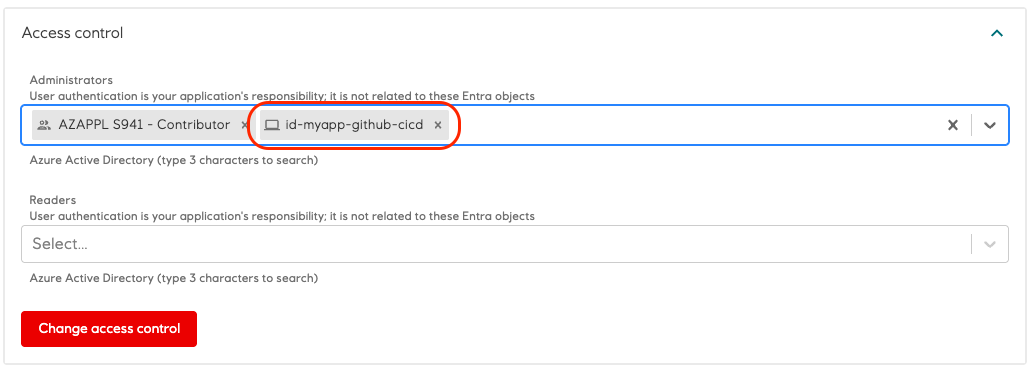
Add the service principal as an administrator of the application.
-
Use the service principal to sign in from your external pipeline job, as described in Making calls to Radix.
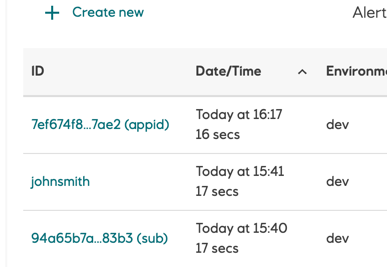
Pipeline jobs created by a service principal show up in the pipeline job list in the Radix web console. The job is labeled with the application ID of the service principal followed by (appid), or with its object ID followed by (sub).
See Connect GitHub and Azure for how to set up federation between GitHub and Azure.
Making calls to Radix
Your pipeline job can call Radix in one of these ways:
- Radix GitHub Actions
The preferred option if you use GitHub Actions for CI. Radix GitHub Actions signs in as the service principal and makes it easy to call Radix from your workflow. See the migration guide from v1 to v2. - Radix CLI
Sign in as the service principal with one of the supportedrx loginoptions, then use the Radix CLI to call Radix. This works with any CI tool. - Radix API
Request an access token for the service principal and call the API directly, passing the token as a bearer token, for examplecurl -X GET --header "Authorization: Bearer $token" <url>.
An access token is valid for one hour and grants every operation an application administrator can perform, including deleting the application and setting secrets. Keep it secret.
Deploying to Radix
Every deployment needs a full image reference for each component and job. You specify the image tag in the image property in one of two ways:
- Directly in
image
Write the tag as part of the image reference, for exampleghcr.io/my-repo/my-app/frontend:latest. The component uses the same tag in every environment and every deployment. - With
{imageTagName}
Put the{imageTagName}placeholder where the tag goes, for exampleghcr.io/my-repo/my-app/api:{imageTagName}. Thedeploypipeline replaces the placeholder with the tag you configure, as described below.
With {imageTagName}, you can set the tag per environment with the imageTagName property under environmentConfig, or override it when you start the deploy pipeline job with the --image-tag-name flag in the Radix CLI. The flag takes precedence over radixconfig.yaml. If an environment has no imageTagName, you must set the tag with --image-tag-name.
In the example radixconfig.yaml, frontend uses latest in every environment. The api component uses master-latest in qa, as set by imageTagName. It has no imageTagName in prod, so the deploy pipeline job must set it:
rx create pipeline-job deploy --application my-app --environment prod --image-tag-name api=release-39f1a082
A tag that changes with every build, for example a branch name combined with the commit SHA, gives you better control over what runs in an environment. It also lets you promote an older deployment if you need to roll back.
Updating a component when the image tag doesn't change
Radix doesn't pull a new image when the tag is the same as in the previous deployment, even if you've pushed a new image to that tag. On each deployment, Radix creates or updates Kubernetes resources from radixconfig.yaml. If those resources are unchanged, Kubernetes leaves the running containers alone. A tag written in image or set with imageTagName in radixconfig.yaml leads to unchanged resources, since the file is identical between deployments.
To run the latest image, restart the component. You can do this from the component page in the web console, or with the restart endpoint in the Radix API or the Radix CLI. Which Radix cluster hosts the application determines the URL of the Radix API.
To avoid the manual restart, set alwaysPullImageOnDeploy to true on the component. Every deployment then changes the underlying Kubernetes resource, which makes Kubernetes pull the latest image from the container registry.
spec:
  environments:
  components:
    - name: api
      image: ghcr.io/my-repo/my-app/api:latest
      alwaysPullImageOnDeploy: true
You can also put the full image reference in the imageTagName property:
  components:
    - name: app
      image: {imageTagName}
      environmentConfig:
        - environment: qa
          imageTagName: ghcr.io/equinor/myapp/backend:qa
        - environment: dev
          imageTagName: ghcr.io/equinor/myapp/backend:dev
Configure Radix to use an external container registry
On the application Configuration page, set the secret for the private image hub to a password or access token accepted by that registry. For GitHub Container Registry (GHCR), use a personal access token with the read:packages scope. See privateImageHubs for registry configuration. You only need this if the images in the registry are private.

Deploy only specific components
If a Radix application has several components and you only need to deploy some of them, use the --component flag in Radix CLI to specify which components to deploy. You can specify the option multiple times, for example --component api --component frontend. Radix doesn't redeploy the other components in the environment. They keep their commitID, gitTags, environment variables, and secrets, and their replicas aren't restarted.
See the Radix CLI deploy command for examples. You can also use the component option with the Radix GitHub action and the Radix API.
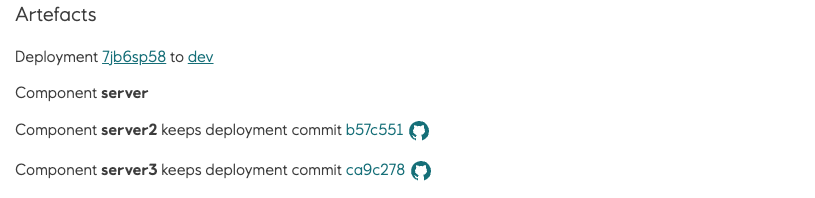
When a deploy pipeline job runs with the --component flag, the Radix Web Console shows which components weren't deployed on the pipeline job, deployment, and environment pages:
Component component1 keeps deployment commit @b57c551
The commit (@b57c551) is shown only if the previous deployment of the component has a CommitID.
Pipeline job
Deployment

Environment

Example
The example workflow deploys master to qa with the tag set by imageTagName in radixconfig.yaml, and release to prod with a tag set by --image-tag-name. The example page describes each step in the workflow.